
- Name
- Tison Brokenshire
Updated on
Best AI Note-Taking Apps in 2026 for Meetings, Lectures, and iPhone
Taking notes manually during lectures, meetings, and research sessions wastes hours every week. You miss key points while writing, lose context switching between apps, and end up with scattered notes that never get reviewed. The problem gets worse with visual content — slides, whiteboard photos, and diagrams contain information that traditional note-taking completely fails to capture.
AI note-taking apps solve this by converting audio, video, images, and slides into structured text notes automatically. But with dozens of tools claiming to be the "best AI note taker," picking the right one is overwhelming. Each tool excels at different input types and workflows.
This guide compares the best AI note-taking apps in 2026 by real use case: meeting summaries, lecture recordings, iPhone photo capture, free study workflows, and browser-based note-taking. Instead of forcing one winner for every workflow, it shows which tool fits the job you actually need to do.
Quick Comparison Table: Best AI Note-Taking Apps by Use Case
| App | Best For | Images/Slides → Notes | Meetings → Notes | Price (Starting) | Free Tier |
|---|---|---|---|---|---|
| Pixno | Visual content & slides | Yes (best) | Yes (audio) | $3/mo | 50 credits/mo |
| Otter.ai | Meeting transcription | No | Yes (best) | $8.33/mo | 300 min/mo |
| NoteGPT | YouTube & video | No | No | $9.99/mo | 15 summaries/mo |
| Notion AI | All-in-one workspace | Limited | Limited | $12/user/mo | Limited AI trial |
| Fireflies.ai | Business meetings | No | Yes | $10/user/mo | 800 min storage |
| StudyFetch | Lecture slides & exams | Partial | Yes (live lecture) | $7.99/mo | 2 uploads |
| Knowt | Flashcards & quizzes | No | No | Free | Unlimited |
| Obsidian + AI | Knowledge management | Via plugins | Via plugins | Free + API costs | Yes |
| Granola | Bot-free meeting notes | No | Yes | $18/mo | 25 meetings |
| Google NotebookLM | Research & learning | Limited | No | Free | Generous |
Prices and plan structures change. For products it currently covers, TierDrift's source-linked SaaS pricing records (opens in a new tab) preserve the public plan, billing unit, official source, and observation date. Verify any product that is not in that directory on the vendor's own pricing page before buying.
Start Here: Best AI Note-Taking Apps by Search Intent
If your query is specific, the best tool is usually narrower than a generic "top 10" list.
| If you searched for... | Best fit | Why |
|---|---|---|
| best ai meeting notes app 2026 comparison | Otter.ai or Fireflies.ai | These are purpose-built for live meeting transcription and searchable summaries. |
| best ai note taking app for recording lectures to bullet points 2026 | Pixno or StudyFetch | Pixno is stronger for slides, whiteboards, and handwritten notes; StudyFetch is stronger for uploaded study materials and quizzes. |
| best ai note taking apps for iphone 2026 | Pixno, Otter.ai, or Notion AI | The right pick depends on whether your iPhone workflow starts with photos, meetings, or workspace notes. |
| best free note taking apps 2026 | Knowt, Google NotebookLM, or Pixno | Each wins a different free use case: study, research, or image-to-notes. |
| best ai note taking chrome extensions 2026 | NoteGPT | It is the strongest browser-first option in this list for turning video and web content into notes. |
| best ai note-taking apps 2026 pricing comparison | Pixno, Otter.ai, or StudyFetch | These give the clearest value depending on whether you care about slides, meetings, or student workflows. |
1. Pixno — Best for Image, Slide, and Visual Note-Taking
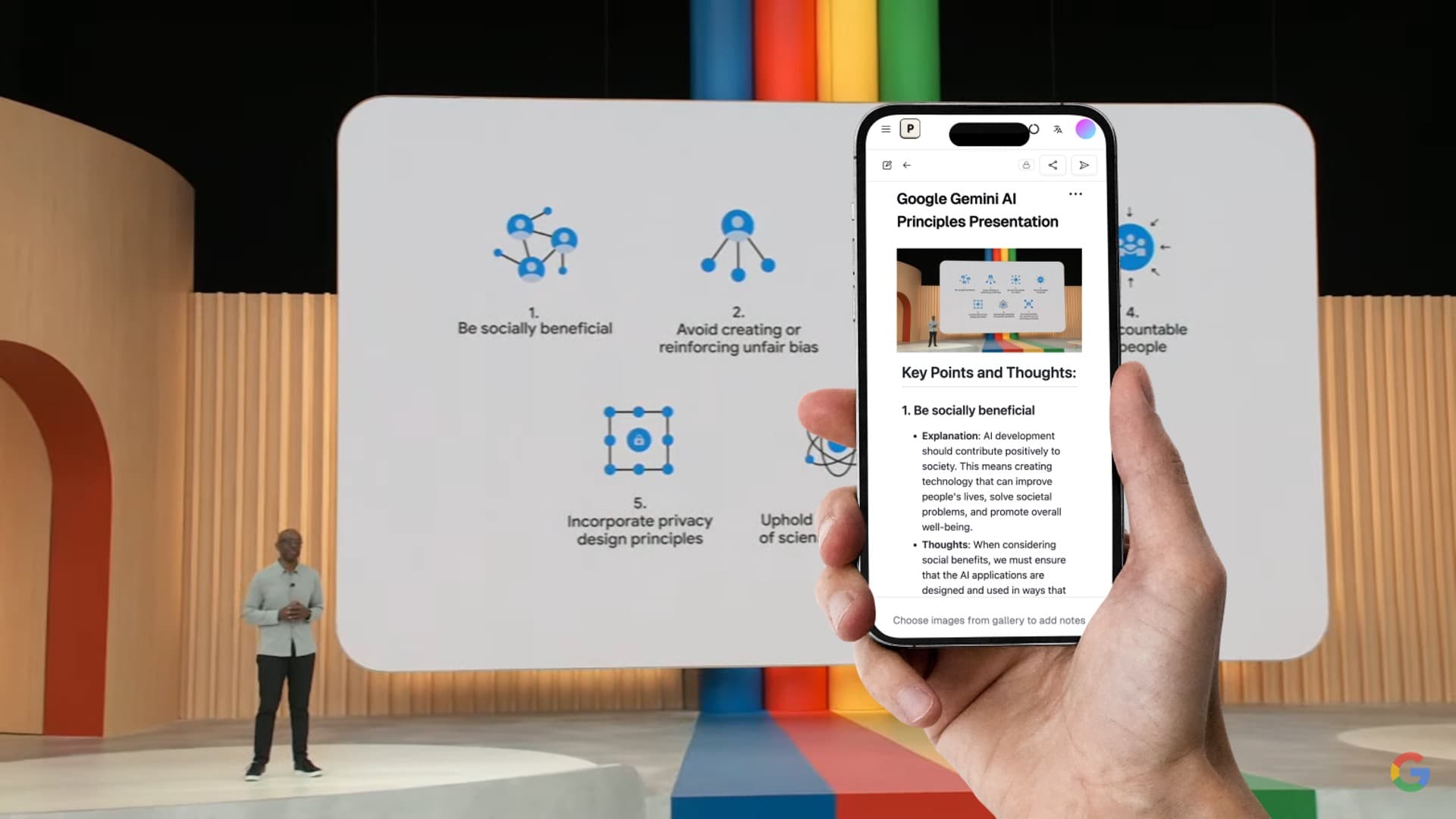
Pixno (opens in a new tab) is the only AI note taker built specifically for visual content. Upload a photo of a whiteboard, a lecture slide deck, a textbook page, or a handwritten note, and Pixno turns it into clean, structured text notes using GPT-4 Vision.
Unlike basic OCR tools that just extract raw text, Pixno understands context. It interprets charts, diagrams, and complex layouts, then reorganizes the information into well-structured notes with headings, bullet points, and key takeaways.
What it handles:
- Photos of whiteboards, handwritten notes, textbook pages
- PowerPoint and lecture slide decks (PDF upload)
- Audio recordings from lectures and meetings
- Multi-image batch processing
Pricing:
| Plan | Monthly | Annual | Credits |
|---|---|---|---|
| Hobby (Free) | $0 | $0 | 50 credits/mo |
| Basic | $5/mo | $3/mo | 1,500 credits/mo |
| Pro | $10/mo | $6/mo | 3,500 credits/mo |
| Ultra | $20/mo | $12/mo | 10,000 credits/mo |
Strengths:
- Unmatched at converting visual content (slides, images, handwriting) into organized notes
- Exports directly to Notion, Google Docs, Obsidian, and MS Word
- Audio-to-notes capability for lectures
- Supports reasoning models like DeepSeek-R1 for complex content
Limitations:
- Not designed for live meeting transcription (no bot joins your call)
- Free tier is limited to ~3 images per month
Best for: Students who photograph lecture slides and whiteboard notes, researchers working with visual data, anyone who needs to turn images into searchable text.
Turn photos to notes and knowledge base
Pixno is your AI note taking assistant that turn photos, audio, docs into well structured text notes and create your personal knowledge base.
Get Started2. Otter.ai — Best for Meeting Transcription
Otter.ai (opens in a new tab) is the market leader in meeting transcription with over $100M in annual recurring revenue. It joins your Zoom, Google Meet, or Microsoft Teams calls and produces real-time transcripts with speaker identification.
The standout feature in 2026 is the AI Meeting Agent — a voice-activated assistant that answers questions during live meetings by pulling information from your organization's past meeting data.
Pricing:
| Plan | Monthly | Annual |
|---|---|---|
| Free | $0 | $0 (300 min/mo) |
| Pro | $16.99/mo | $8.33/mo |
| Business | $30/mo | $20/mo |
Strengths:
- Best-in-class meeting transcription accuracy
- AI Meeting Agent answers questions during live calls
- HIPAA compliant (since July 2025)
- Transcription in 100+ languages
Limitations:
- Cannot process images, slides, or visual content
- Requires a bot to join meetings (some participants find this intrusive)
- Free tier limited to 30-minute conversations
Best for: Professionals who need every meeting transcribed and searchable. Sales teams, managers, and executives who attend many calls daily.
3. NoteGPT — Best for YouTube and Video Notes
NoteGPT (opens in a new tab) hit 11.4 million monthly visits in December 2025 by solving one problem extremely well: summarizing YouTube videos. Paste a video URL (or use the Chrome extension), and NoteGPT generates a summary, full transcript, mind map, and even a slide deck from the content.
Pricing:
| Plan | Price | Quotas |
|---|---|---|
| Free | $0 | 15 requests/mo |
| Pro | $9.99/mo | 1,000/mo |
| Unlimited | $29/mo | Unlimited |
Strengths:
- Processes YouTube videos up to 2 hours, even without captions
- Generates mind maps and slide decks from video content
- Chrome extension for one-click YouTube summaries
- Also handles PDFs and web articles
Limitations:
- No image or slide processing capability
- No live meeting integration
- Quality varies significantly with video length and complexity
Best for: Students and researchers who learn from YouTube tutorials and online lectures.
4. Notion AI — Best All-in-One Workspace
Notion (opens in a new tab) doesn't need introduction as a workspace tool. Its AI features, now bundled into the Business plan ($20/user/mo), can generate summaries, answer questions about your workspace, draft content, and run autonomous agents that work across hundreds of pages for up to 20 minutes.
Pricing:
| Plan | Annual Price | AI Access |
|---|---|---|
| Free | $0 | Limited trial |
| Plus | $12/user/mo | Limited trial |
| Business | $20/user/mo | Full AI included |
Strengths:
- AI is deeply integrated into docs, databases, wikis, and projects
- Autonomous AI Agents (Notion 3.0) can handle multi-step tasks
- Offline mode available since August 2025
- Massive template ecosystem
Limitations:
- Not a dedicated note-taking-from-content tool — AI assists writing, doesn't generate notes from images/audio
- Expensive for individual users ($20/mo for full AI)
- Learning curve for new users
Best for: Teams that need an all-in-one workspace where AI assists with writing and organization across projects.
5. Fireflies.ai — Best for Business Meeting Intelligence
Fireflies.ai (opens in a new tab) reached a $1 billion valuation in 2025 by combining meeting transcription with business intelligence. Its partnership with Perplexity powers a voice assistant that answers questions with real-time web search during meetings — say "Hey Fireflies!" during any call.
Pricing:
| Plan | Monthly | Annual |
|---|---|---|
| Free | $0 | $0 (800 min storage) |
| Pro | $18/user/mo | $10/user/mo |
| Business | $30/user/mo | $19/user/mo |
Strengths:
- "Talk to Fireflies" voice assistant with live web search
- 200+ AI Apps for department-specific workflows
- Real-time meeting notes
- Conversation intelligence analytics
Limitations:
- No image/slide processing
- Enterprise-focused pricing
- Free tier has limited AI summary capabilities
Best for: Sales teams, customer success managers, and business leaders who need meeting intelligence beyond basic transcription.
6. StudyFetch — Best for Lecture Slide Study Guides
StudyFetch (opens in a new tab) is purpose-built for students. Upload your lecture slides, textbook chapters, or recordings, and its AI tutor "Spark.E" creates study guides, flashcards, and practice quizzes — referencing only your course materials to reduce hallucination.
Pricing:
| Plan | Price | Features |
|---|---|---|
| Free | $0 | 2 uploads, 10 chats |
| Base | $7.99/mo | 100 study sets |
| Premium | $11.99/mo | Unlimited + Live Lecture mode |
| Semester | $49.99 one-time | Full term |
Strengths:
- AI tutor references only your uploaded materials (reduces AI hallucination)
- Live Lecture mode transcribes and timestamps in real time
- 6+ million students used it in 2025
- Semester pricing option is cost-effective
Limitations:
- Cannot process photos of handwritten notes or whiteboard images
- Focused exclusively on study use cases
- Free tier is very limited (2 uploads)
Best for: College students who want to turn lecture slides and textbooks into study guides and practice quizzes.
7. Knowt — Best Free AI Study Tool
Knowt (opens in a new tab) offers the most generous free tier among all AI study tools — unlimited flashcard creation, quiz generation, spaced repetition, and Quizlet import, all at no cost. The AI study companion "Kai" now supports voice calls for conversational study sessions.
Pricing:
| Plan | Price | Features |
|---|---|---|
| Free | $0 | Unlimited flashcards, quizzes, spaced repetition |
| Premium | $5/mo | Advanced stats, enhanced customization |
| Ultra | $9.99/mo | All features, priority support |
Strengths:
- Best free tier: unlimited flashcards and quizzes at $0
- "Call with Kai" voice study mode
- Imports directly from Quizlet
- LMS integration (Canvas, Google Classroom)
Limitations:
- No image-to-notes or slide processing
- No meeting or audio transcription
- Focused solely on flashcard-based study
Best for: Students looking for a free Quizlet alternative with AI-generated flashcards and quizzes.
8. Obsidian + AI Plugins — Best for Knowledge Management
Obsidian (opens in a new tab) stores all your notes as local Markdown files — no vendor lock-in, no cloud dependency. With 1,800+ community plugins, you can add AI capabilities using your own API keys (OpenAI, Claude, local LLMs) while keeping complete control over your data.
Pricing:
| Component | Price |
|---|---|
| Obsidian (personal) | Free |
| Obsidian Sync | $4/mo |
| AI plugins | Free (+ your API costs) |
Strengths:
- Complete data ownership — local Markdown files
- Choose your own AI model (GPT-4, Claude, Llama, local LLMs)
- Bases feature (v1.10) adds database views
- Pixno plugin available for image-to-notes directly in Obsidian
Limitations:
- Requires setup and configuration for AI features
- No built-in meeting transcription
- Steeper learning curve than other tools
Best for: Power users, developers, and researchers who want full control over their notes and AI tooling.
9. Granola — Best Bot-Free Meeting Notes
Granola (opens in a new tab) raised $43M at a $250M valuation in 2025 by offering meeting notes without a bot. It captures audio directly from your device's audio output — no bot joins your call, no audio is stored permanently. Participants never know you're using it.
Pricing:
| Plan | Price | Limits |
|---|---|---|
| Free | $0 | 25 meetings |
| Individual | $18/mo | Unlimited |
| Business | $14/user/mo | Team features |
Strengths:
- No meeting bot — captures audio without participants knowing
- No audio stored after processing
- Clean, privacy-focused approach
- 90-92% transcription accuracy
Limitations:
- Mac-only (as of early 2026)
- No image or slide processing
- No video content support
Best for: Anyone who wants meeting notes but hates having bots join their calls. Popular with consultants, founders, and managers.
10. Google NotebookLM — Best Free Research Tool
Google NotebookLM (opens in a new tab) lets you upload sources (PDFs, Google Docs, websites, YouTube videos) and then ask questions, generate summaries, and even create AI-generated podcasts ("Audio Overviews") from your materials. The free tier is remarkably generous.
Strengths:
- Free tier with substantial capabilities
- Audio Overviews turn documents into podcast-style discussions
- Deep Research mode for complex topics
- Integrates with Google Workspace
Limitations:
- Cannot process raw images or photos
- No meeting transcription
- Requires Google account
- Less structured output compared to dedicated note-taking apps
Best for: Researchers and students who want to synthesize information from multiple documents and get AI-generated summaries.
Best AI Note-Taking Apps for iPhone in 2026
The best AI note-taking app for iPhone depends on what you capture first.
- If you mostly take photos of slides, whiteboards, textbook pages, or handwritten notes, Pixno is the best fit because the workflow starts from visual content.
- If you mostly record calls, interviews, or spoken ideas, Otter.ai is the better fit because meeting transcription is its core job.
- If you already organize everything inside one workspace, Notion AI is the stronger option because your notes, docs, and projects stay in the same system.
This is why the broad keyword "best ai note taking apps for iphone 2026" is misleading: iPhone users do not all want the same kind of note-taking workflow.
Best AI Note-Taking Chrome Extensions in 2026
For Chrome-first note-taking, NoteGPT is the clearest winner in this list. It is built around browser and video workflows, especially YouTube summaries and web content.
If your real need is not browser summarization but meeting notes, choose Otter.ai or Fireflies.ai instead. They are stronger for live calls, transcripts, and follow-up notes than a generic Chrome extension workflow.
Best AI Note-Taking App for Recording Lectures to Bullet Points
If the lecture is visual, Pixno is the best option in this list. It handles lecture slides, whiteboards, textbook pages, and handwritten notes, then turns them into structured bullet points instead of raw OCR text.
If the lecture workflow starts from uploaded course materials and you also want quizzes or study guides, StudyFetch is the stronger choice. If the lecture is mostly audio and you only need a transcript, Otter.ai is the better fit.
For step-by-step workflows, see Convert Lecture Slides to Notes, How to Turn PowerPoint Slides into Study Notes (3 Methods), and Turn PowerPoint into Notes with AI.
AI Note-Taking Apps Pricing Comparison in 2026
The pricing tables below are useful, but most readers want the short answer first.
| If you care most about... | Best value pick | Why |
|---|---|---|
| lowest starting price for visual notes | Pixno | Lowest paid entry in this list for slide, image, and handwriting workflows. |
| free study tools | Knowt | The free tier is the strongest if your goal is flashcards, quizzes, and review. |
| free research notes | Google NotebookLM | Best free option when your notes come from documents and research materials. |
| meeting notes at scale | Otter.ai or Fireflies.ai | Better value than general-purpose apps when transcription is the main job. |
| semester-based student workflow | StudyFetch | The one-time semester plan is useful if you want study support for a fixed term. |
Which AI Note-Taking App Has the Best Multilingual Support?
If multilingual audio transcription is the priority, Otter.ai is the strongest option in this comparison because it supports 100+ languages.
If your workflow is not audio-first but visual-first, use Pixno for slides, scanned notes, and handwriting, then test it on your actual material before standardizing on it. Multilingual support matters most when the source material is messy, mixed-language, or diagram-heavy.
How to Choose the Right AI Note Taker
The best tool depends on what type of content you need to turn into notes:
| If You Need To... | Best Choice | Runner-Up |
|---|---|---|
| Turn photos/slides into notes | Pixno | StudyFetch |
| Transcribe meetings automatically | Otter.ai | Fireflies.ai |
| Summarize YouTube videos | NoteGPT | Google NotebookLM |
| Build a connected knowledge base | Obsidian + AI | Notion AI |
| Create flashcards from lectures | Knowt | StudyFetch |
| Get meeting notes without a bot | Granola | Pixno (audio mode) |
| Work with your team in one workspace | Notion AI | Fireflies.ai |
| Research across multiple documents | Google NotebookLM | Notion AI |
| Convert handwriting to digital text | Pixno | Obsidian + Pixno plugin |
For Students
If you photograph lecture slides, whiteboard notes, or textbook pages, Pixno is the clear winner — no other tool handles visual content as well. Pair it with Knowt for flashcard-based review, or with Obsidian for long-term knowledge management.
If your lectures are primarily audio/video, combine StudyFetch (for slide decks) with NoteGPT (for recorded lectures on YouTube).
For Professionals
If your day is filled with meetings, Otter.ai or Fireflies.ai handles transcription. Use Granola if meeting bots aren't welcome. For project documentation and team wikis, Notion AI remains the strongest all-in-one workspace.
For Researchers
Start with Google NotebookLM for synthesizing multiple sources. Use Pixno for any visual data (charts, figures, scanned papers), and Obsidian for building a long-term personal knowledge base.
FAQ
What is the best free AI note-taking app?
Knowt offers the most generous free tier for study-focused note-taking (unlimited flashcards and quizzes). For general note-taking from images, Pixno provides 50 free credits per month. Google NotebookLM is the best free option for research and document synthesis.
Which AI note-taking app is best for recording lectures to bullet points?
Pixno is the best choice when lectures include slides, whiteboards, or handwritten notes because it turns visual materials into structured bullet points. StudyFetch is better when you upload lecture decks and want quizzes, while Otter.ai is the better fit if you only need audio transcription.
Can AI note takers handle handwritten notes?
Yes — Pixno is specifically designed to convert handwritten notes into structured digital text using GPT-4 Vision. It goes beyond basic OCR by understanding context and organizing the output. Other tools like Obsidian can do this through the Pixno plugin.
What is the best AI note-taking Chrome extension?
NoteGPT is the strongest Chrome-first option for turning YouTube videos and web content into notes. For meeting transcription, Otter.ai and Fireflies.ai are better picks than a generic browser extension because they focus on live calls, transcripts, and follow-up workflows.
Are AI-generated notes accurate enough to study from?
Modern AI note-taking tools achieve 90%+ accuracy for transcription and text extraction. However, you should always review AI-generated notes for accuracy, especially for technical or specialized content. Tools like StudyFetch reduce hallucination by only referencing your uploaded materials.
Which AI note-taking app has the best multilingual support?
Otter.ai is the safest pick when multilingual transcription is the priority because it supports 100+ languages. If your notes come from slides, documents, or handwritten material instead of audio, a vision-first tool like Pixno is the better fit.
Related Reading
- Best AI Meeting Notes Apps in 2026 — Compare the strongest tools for meeting transcription and follow-up
- Otter.ai vs Fireflies.ai vs Notion AI vs Mem vs Reflect 2026 — Compare mixed-intent meeting tools and personal AI note systems
- AI Notes Generator: How to Auto-Generate Study Notes — Generate notes from slides, images, and audio automatically
- How to Turn PowerPoint Slides into Study Notes (3 Methods) — AI, manual, and hybrid approaches compared
- Turn PowerPoint into Notes with AI — Convert lecture slides automatically
- Best Image to Text AI Tools in 2026 — Compare OCR and AI-powered text extraction tools
- How to Convert Handwriting to Text — Complete guide with tool comparisons
- Notion vs Obsidian — Which note-taking app wins in 2026
- Notion AI vs ChatGPT — Where Notion AI beats ChatGPT
- Cornell Notes with AI — Upgrade the Cornell method with AI tools
- Note Maker AI: 7 Best Tools Compared — Find the right AI note maker for your workflow
- Best Otter.ai Alternatives — Privacy-first alternatives to Otter.ai
- Free AI Note Generator Tools Compared — Best free options for students on a budget
- Convert Lecture Slides to Notes — Turn any lecture deck into study notes
- Best AI Tools in 2026 — Top 12 AI tools across all categories
- Effective Note-Taking Tips — Practical techniques that work in class